Free Pomodoro Technique Worksheets: Printable PDF Templates & Cheat Sheet
Free, original Pomodoro Technique printables and visual guides: the three tracking worksheets, a one-page cheat sheet, and a first-session walkthrough. Free to print, no signup, then start a session in one click.

Jonathan Griffin
Productivity Researcher
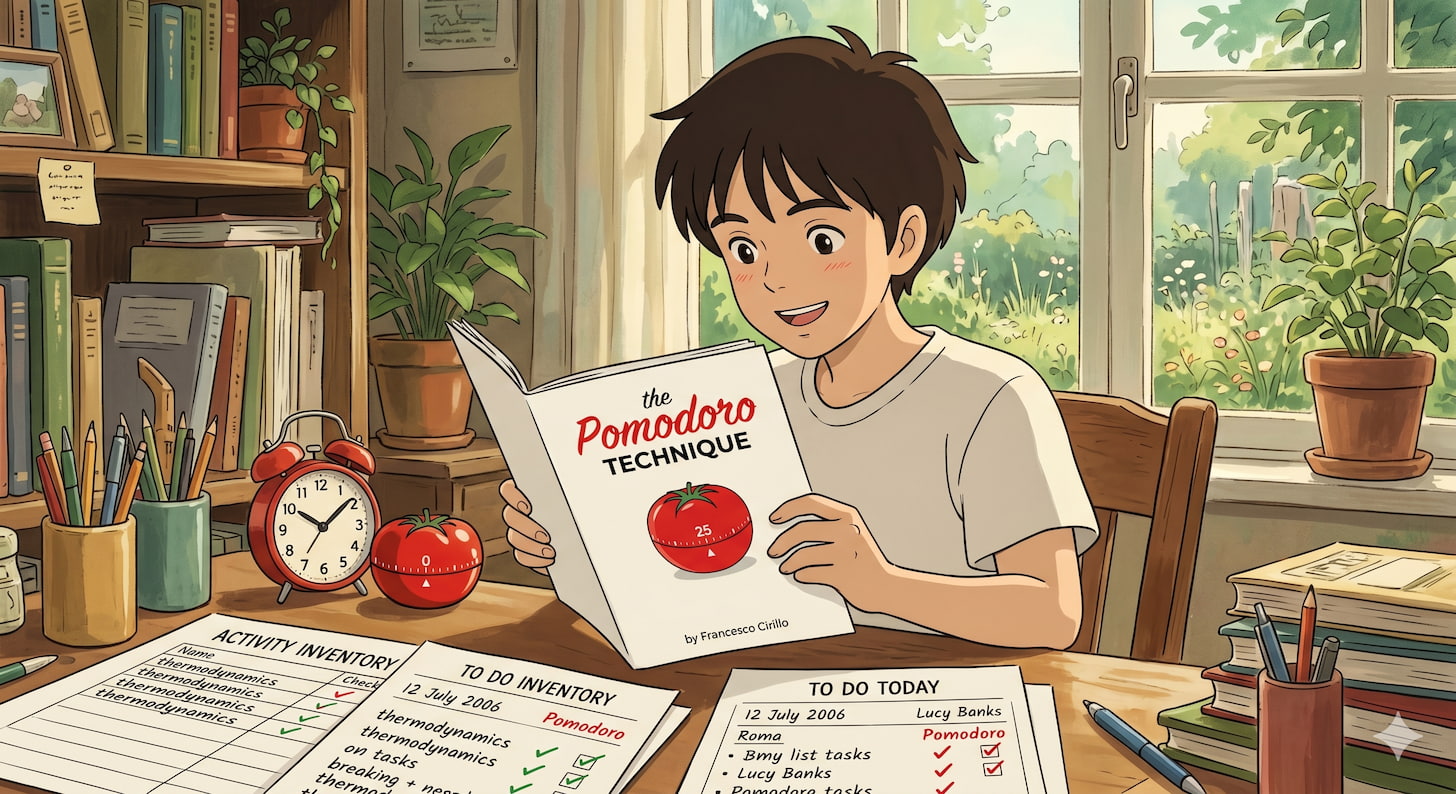
Everything you need to run the Pomodoro Technique on paper, free to download and print, with no signup. Below you will find printable templates for the three tracking worksheets the method is built on (the Activity Inventory, the To Do Today Sheet, and the Records Sheet), plus a one-page cheat sheet and a walkthrough of your very first session. Every download is a clean, original pomodo.io design, free to print or copy.
The method itself was created by Francesco Cirillo , and it was designed around radical simplicity: “many time management techniques fail because they subject the people who use them to a higher level of added complexity”[1]. A timer and a sheet of paper is the whole system. If you would rather skip printing, the free pomodo.io timer gives you the timing half digitally, with zero setup.
Table of Contents
Free Pomodoro worksheets, guides, and how to use them
Your Free Pomodoro Download Library
Every worksheet and guide on this page, ready to save or print
Why the Method Runs on a Timer and a Few Sheets
The deliberate simplicity behind the paper toolkit
The Three Tracking Worksheets
The Activity Inventory, To Do Today, and Records sheets explained
The Visual Guides
The one-page cheat sheet and the first-session walkthrough
Common Questions
How to use, print, and adapt the sheets
Start a Session in One Click
The fastest way to put the method to work right now
Additional Resources
Supporting sections and references
Your Free Pomodoro Download Library
Every worksheet and guide on this page, ready to save or print
Here is the full set, free for personal and classroom use, with nothing to sign up for. Every download is an original pomodo.io design: the worksheets come as a printable PDF and an editable Google Doc, and the visual guides as an image or a print-ready PDF. Each resource is shown and explained in detail further down.
| Resource | What it is for | Download |
|---|---|---|
| To Do Today Sheet | Your prioritised plan for a single day | PDF · Google Doc |
| Activity Inventory Sheet | Your running backlog of everything still to do | PDF · Google Doc |
| Records Sheet | Your end-of-day archive of real effort | PDF · Google Doc |
| Pomodoro Cheat Sheet | The whole method on a single page | JPG · PNG · PDF |
| Your First Pomodoro Session | A step-by-step walkthrough for day one | JPG · PNG · PDF |
Why the Method Runs on a Timer and a Few Sheets
The deliberate simplicity behind the paper toolkit
The Pomodoro Technique asks for almost nothing. As Cirillo lists it, the entire toolkit is “a kitchen timer” plus a To Do Today Sheet, an Activity Inventory Sheet, and a Records Sheet[1]. That is the whole system. No app is required, and nothing here needs a battery.
The simplicity is not an accident or a limitation. It is the point. Cirillo argues that tools should never add more complexity than the task already carries:
“Employing easy-to-use, unobtrusive tools reduces the complexity of applying the Technique while favoring continuity, and allows you to concentrate your efforts on the activities you want to accomplish. Many time management techniques fail because they subject the people who use them to a higher level of added complexity with respect to the intrinsic complexity of the task at hand.[1]
He extends the same rule to tracking, advising practitioners to “keep Tracking at the lowest possible level of complexity” and to choose simple tools, noting that “using paper, pencil and eraser serves as a useful mental exercise”[1].
This paper-first idea has deeper roots than the technique itself. Tony Buzan had already made the cognitive case for it: the mind can hold only about seven things “in suspension,” and past that point “the only way we can avoid losing control of things is by fixing them externally,” on paper[2]. His own self-management system put that into practice with an exhaustive capture list, a short set of priorities chunked down from it, and a planned-versus-actual review page, a structure that closely prefigures these same three sheets[2].
This is why the worksheets matter, and why we kept them plain. They are the lowest-friction way to plan a day, mark your work as you go, and learn from it afterwards. The sections below cover each sheet in turn.
The Three Tracking Worksheets
The Activity Inventory, To Do Today, and Records sheets explained
The three sheets divide the work cleanly: one holds everything you might do, one holds what you are doing today, and one records what you actually did.
1. The Activity Inventory Sheet
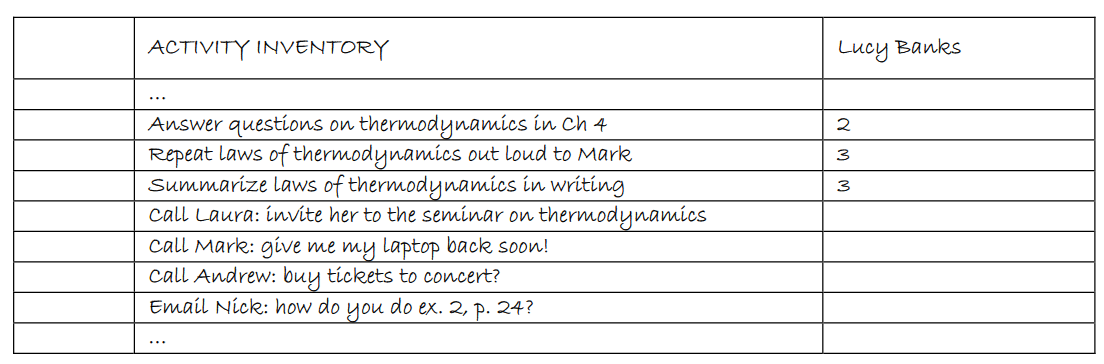
This is your master backlog. Its layout is deliberately spare: a heading with your name, then a series of lines where activities are “noted down as they come up,” and checked off at the end of the day once completed[1]. Unlike a daily list, it is never rewritten each morning; it simply accumulates.
The Inventory holds all the activities that need doing, not just today’s. Tasks arrive from two places: the planning you do to reach a goal, and the new work that surfaces while handling interruptions. When an activity loses its purpose over time, you delete it, so the list stays a live record of work that still matters rather than an ever-growing pile[1].
2. The To Do Today Sheet
Every morning you choose what you are committing to from the Inventory, and those tasks go on a fresh To Do Today Sheet. Cirillo gives it a fixed three-part structure: a heading with place, date, and author; a list of the day’s tasks in order of priority; and a section labelled “Unplanned and Urgent Activities” where unexpected tasks are logged as they arise[1]. That last section has an older pedigree: Buzan found that giving interruptions a planned home, rather than fighting them, made each one “expected, and therefore acceptable, rather than resented”[2].
As you work, you record progress directly on this sheet. When the timer rings, you “mark an X next to the activity you’ve been working on” and take a short break[1]. Each X is one completed, uninterrupted 25-minute block. What you are tracking is “the number of Pomodoros actually completed: the real effort,” which Cirillo calls “the key to fully understanding the Pomodoro Technique”[1]. The Xs measure what happened, not what you hoped would happen.

3. The Records Sheet
The Records Sheet is the most overlooked of the three, and the one that turns the technique from a focus trick into a way to improve. At the end of each day, your completed work is transferred into this archive. Cirillo’s example fields are the date, start time, type of activity, description, the actual number of Pomodoros, and a short note on results and possible room for improvement[1].
Its purpose goes beyond logging. As Cirillo puts it, “recording provides an effective tool for people who apply the Pomodoro Technique in terms of self-observation and decision-making aimed at process improvement”[1]. Over time it lets you ask the questions that actually change how you work: “What should I cut out? What activities are really useful? How can I reorganize them to be more effective?"[1]
There is a cognitive reason this works. Buzan described the brain as “a self-correcting organ” that “works much like a guided spaceship”: given a target and feedback on when it drifts off course, it “will automatically realign its path”[2]. The Records Sheet is simply what supplies that feedback, a running record of the gap between what you planned and what actually happened.

The Visual Guides
The one-page cheat sheet and the first-session walkthrough
Two more downloads pull the method together visually. Both are designed to be read at a glance and pinned somewhere you will see them.
The Pomodoro Cheat Sheet
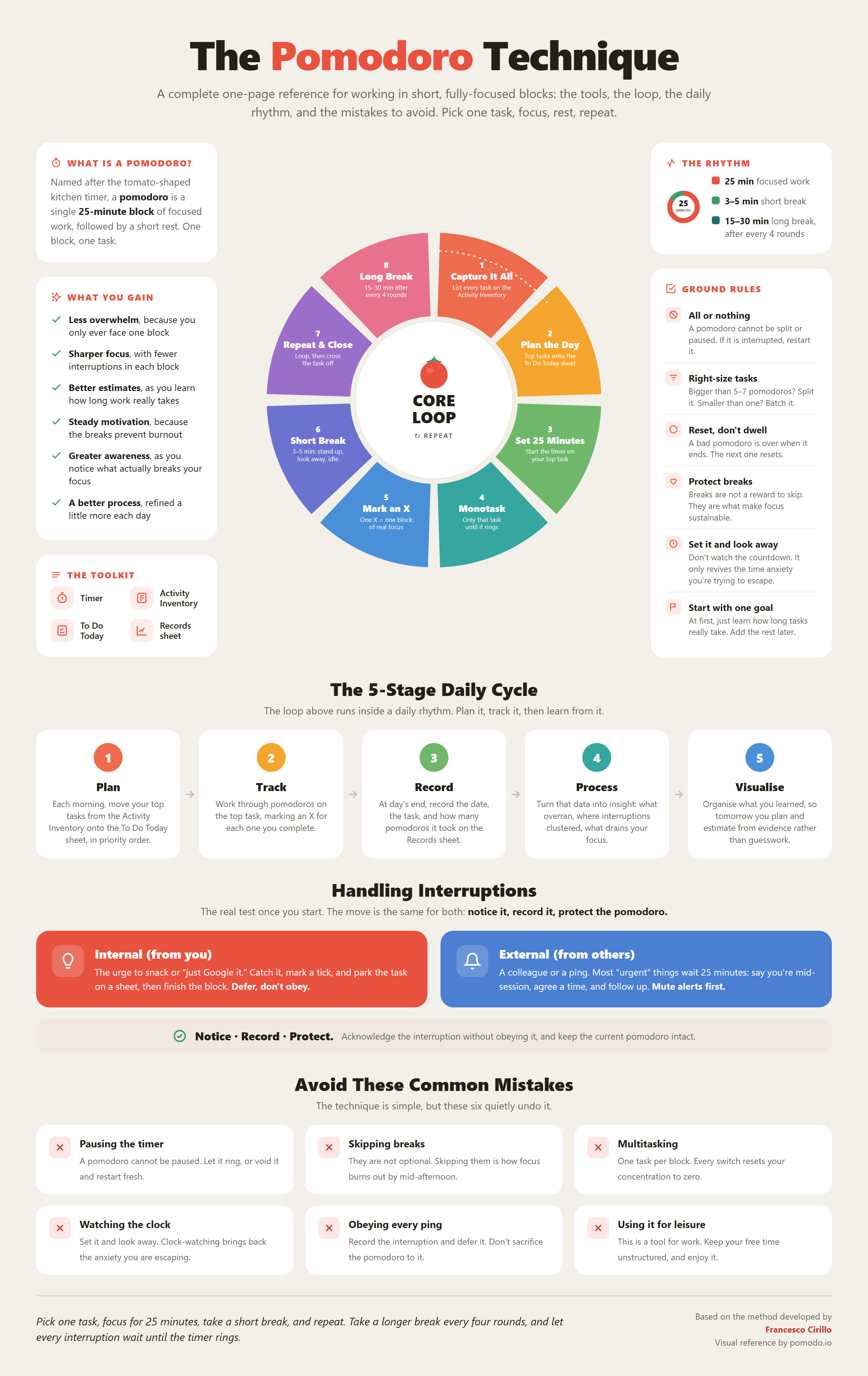
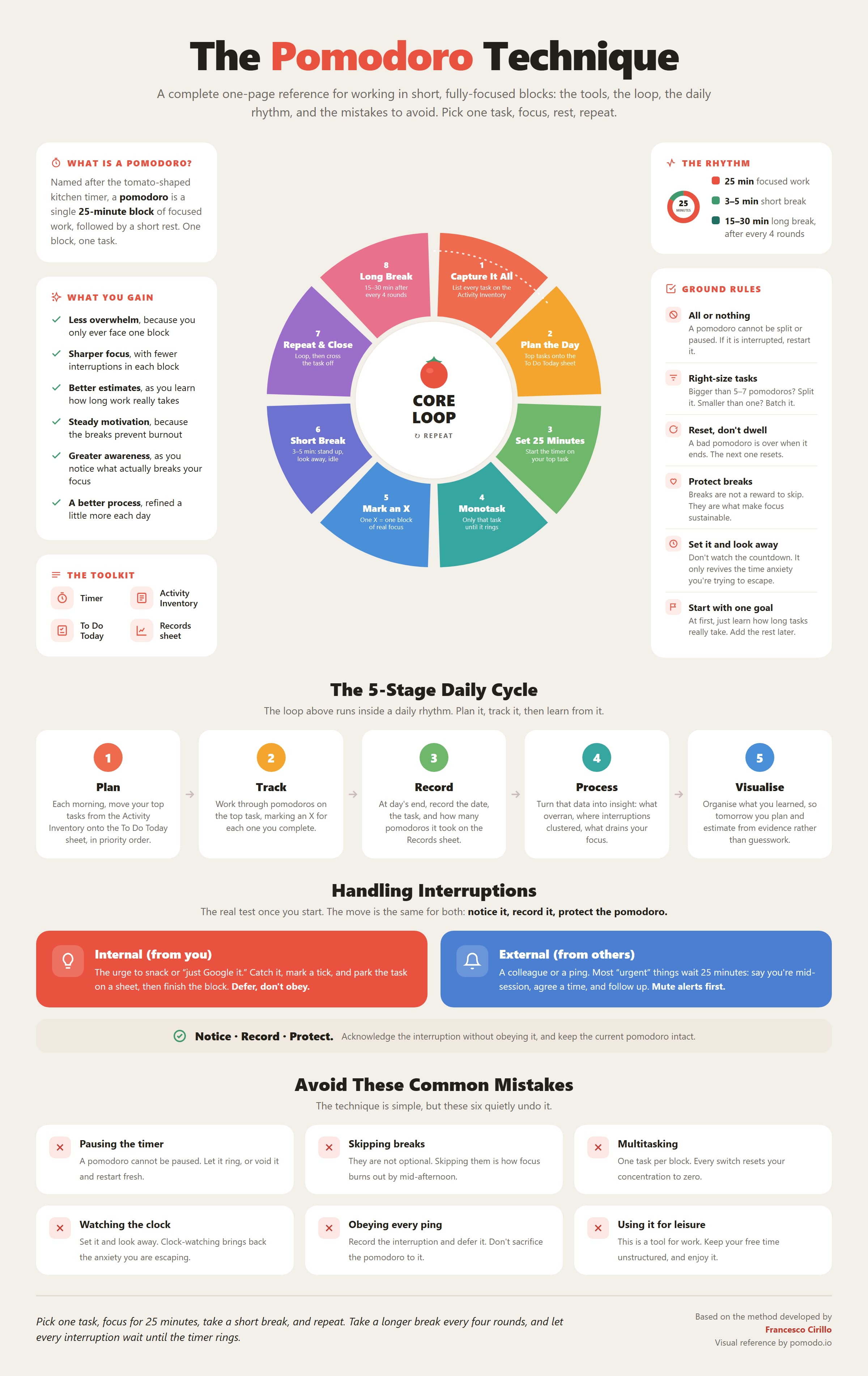
One page covering the whole method: the core loop of work and rest, the toolkit, the rhythm of breaks, the ground rules, the five-stage daily cycle, and the most common mistakes. It is the fastest reference to keep beside your desk while the habit is still forming. The 25-minute block is not an arbitrary figure either: Buzan had earlier called it “essential” to break study into “20-40 minute sections with small rests in between,” and the Pomodoro sits squarely inside that band[3].
Your First Pomodoro Session
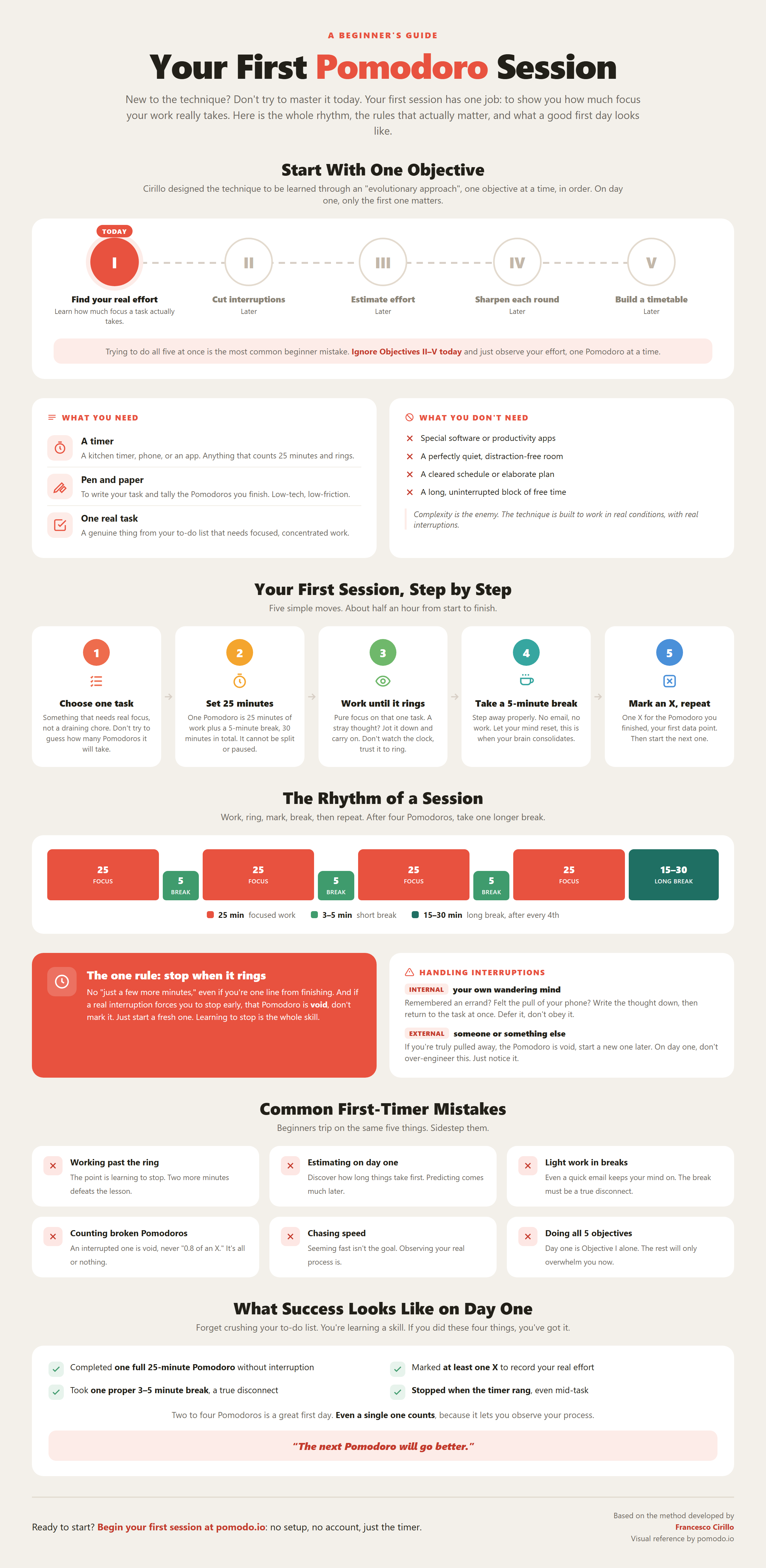
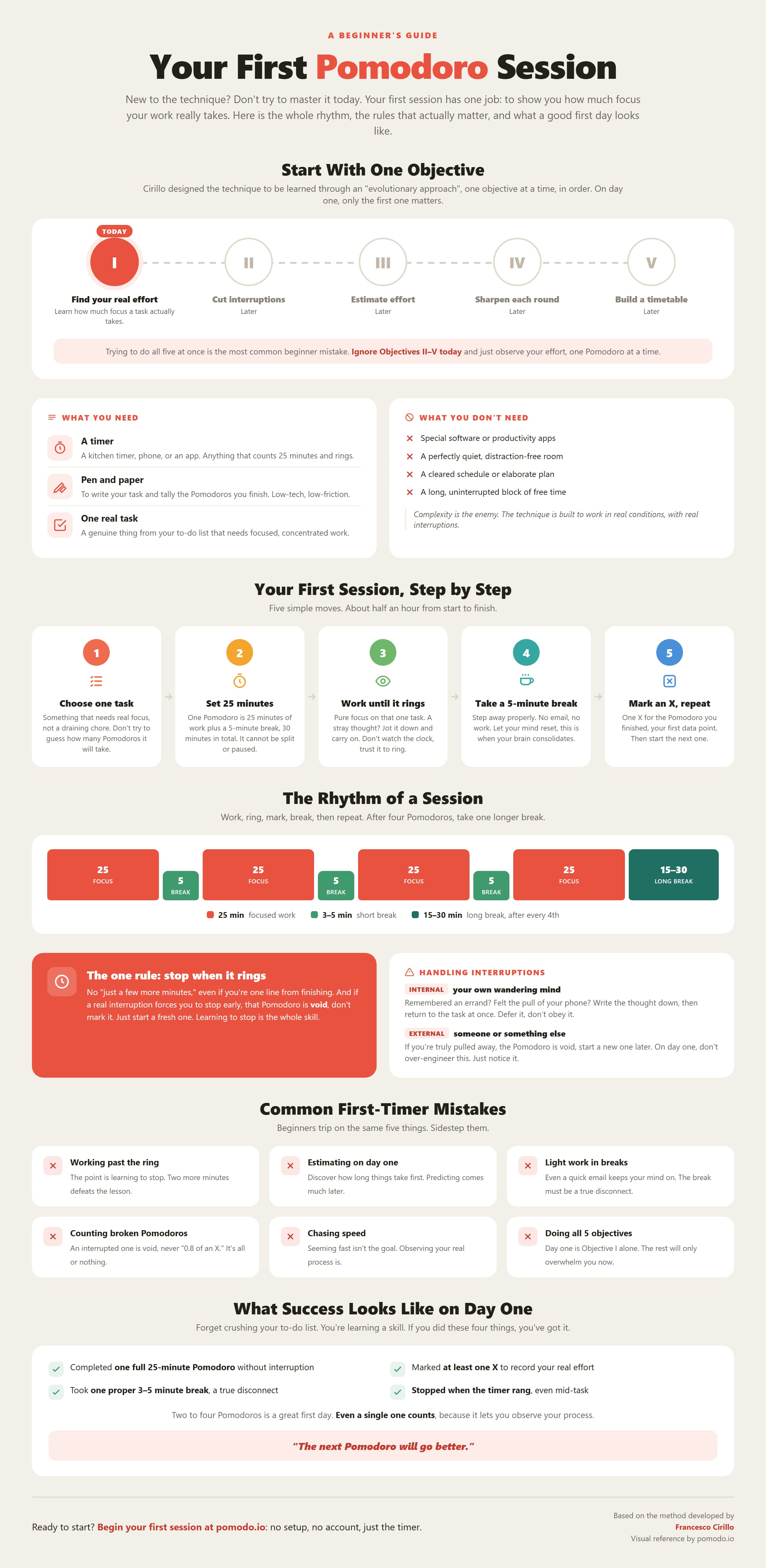
A walkthrough built specifically for day one. It maps out the five objectives as a simple roadmap, lays the session out on a timeline (work, short break, repeat, then a longer break), and ends with a checklist for what a successful first day looks like. If the cheat sheet is the reference, this is the on-ramp.
Common Questions
How to use, print, and adapt the sheets
The questions that come up most often about the sheets, answered directly.
Are these Pomodoro printables really free?
Yes. Every sheet and guide on this page is free to download, print, and use for your own work or in a classroom. They are original pomodo.io designs, so there is nothing to buy and nothing to sign up for.
How do I use the three sheets together?
Start with the Activity Inventory as your running backlog. Each morning, pull the day’s priorities onto a fresh To Do Today Sheet. As you complete each 25-minute block, mark an X on that sheet[1]. At the end of the day, move what you finished onto the Records Sheet so you can spot patterns over time[1].
Can I get an editable or digital version?
Yes for the To Do Today Sheet: there is an editable Google Doc you can copy and customise. The method works the same on paper or on screen, so use whichever keeps your friction lowest. For the timing itself, the pomodo.io timer handles the 25-minute count for you.
Do I need anything else to start?
No. A timer and a single sheet is enough to begin. The full toolkit is just a kitchen timer and three sheets[1], and everything beyond that is added gradually as you practise. The deliberate low setup is the whole design[1]. If you want to be walked through it, our beginner’s guide takes you step by step through your very first session.
Who created the Pomodoro Technique?
Francesco Cirillo developed it in the late 1980s as a student, using a tomato-shaped kitchen timer[1]. You can read the full story in Who is Francesco Cirillo?
Start a Session in One Click
The fastest way to put the method to work right now
Print the sheets if paper helps you think. The point of the whole toolkit, in Cirillo’s words, is to reduce “the complexity of applying the Technique” so you can “concentrate your efforts on the activities you want to accomplish”[1].
If you would rather just begin, the timer is the one part you do not have to print. No account, no configuration, no download: pick a task, start the count, and mark your first X when it rings.
You also do not have to follow it rigidly. One user, recanting an earlier anti-Pomodoro post, described the timer as “training wheels for ur brain,” to “use them only when u need them”[4], which is exactly the kind of flexible, low-pressure use these sheets are meant to support.
Want the full method explained first? Follow the Getting Started guide for a step-by-step first session, or read the story of who created the technique .
References
Sources and citations for this article
- 1.Cirillo, F. (2007). The Pomodoro Technique (Version 1.3). Self-published. (Cited on p. 4, p. 5, p. 22, p. 15, p. 15, fig. 2.20, p. 6, p. 8, p. 7, fig. 2.5, p. 9, and p. 18, fig. 2.28)
- 2.Buzan, T. (1983). The Brain User's Guide. Dutton. (Cited on p. 42, pp. 29, 125, p. 49, and p. 65)
- 3.Buzan, T. (1982). Use your head. Ariel. (Cited on p. 131)
- 4.Sea-Patience-8628. (2025, January 9). I was completely wrong about pomodoro [Reddit post]. r/ProductivityApps.
About the Author
Jonathan Griffin is a productivity researcher and former UK commercial property solicitor. He translates neuroscience and cognitive science research into practical, evidence-based systems for focus and attention.